
Skylight Calendar Alternative: The Family Board Without the $319.99 Screen
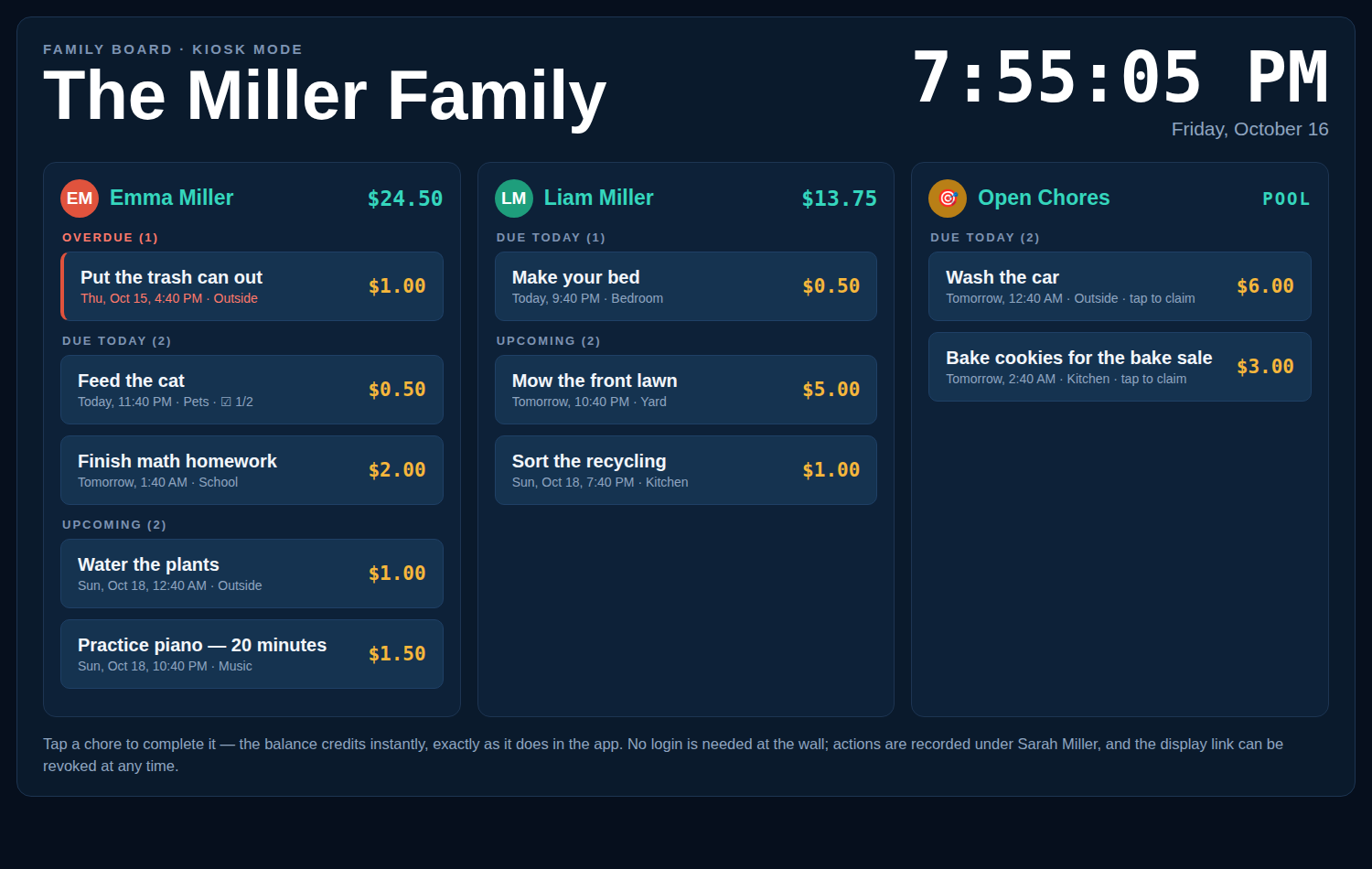
A Skylight Calendar alternative is a way to get the wall-display family board without buying dedicated hardware. Chore-List does it with kiosk mode: any tablet, old iPad, or TV browser you already own becomes a fullscreen chore board - free - and every chore pays real dollars, not just stars.
Skylight Calendar 2 (15″): $319.99 + $79/year for Plus Chore-List kiosk mode: $0 hardware, $0 subscription
How much does a Skylight Calendar really cost?
As of October 2026, the 15-inch Skylight Calendar 2 sells for $319.99 on Skylight’s own store, and the features most families buy it for - photo screensaver, Magic Import, and Rewards - require Calendar Plus at $79 per year. That is $398.99 in year one and about $556.99 over three years, for one proprietary screen in one room. Chore-List costs $0: it runs in a browser, so the display is whatever screen your family already has.
| Skylight Calendar 2 | Chore-List (kiosk mode) | |
|---|---|---|
| Hardware | $319.99 proprietary 15″ display | $0 - any tablet, iPad, or TV browser you own |
| Subscription | $79/yr Plus for rewards, photo screensaver, Magic Import | $0 |
| Cost over 3 years | ≈ $556.99 | $0 |
| Chore rewards | Stars (1-500 per reward), Plus subscribers only | Real dollar balances, credited instantly, free |
| Rewards store | No priced store or balance | Yes - rewards with prices, frequency, and stock |
| Open chore pool | No | Yes - unassigned chores any kid can claim and earn |
| Photo proof of work | No | Yes - attach a photo on completion |
| Second room | Buy a second device | Open another display link - free |
| Calendar sync & meal planning | Yes - its core strength | No - Chore-List is a chore board, not a calendar |
| API for AI assistants | No | Full REST API + MCP server |
Skylight prices checked on myskylight.com, October 15, 2026. Plus price as listed by Skylight and reported by the NY Post and Mango Display.
How kiosk mode works
- Create a display link. In Chore-List settings, an adult creates a display link and chooses which family lists it shows. The link is revocable at any time.
- Open it on any screen. A kitchen tablet, an old iPad, a Fire tablet, or a smart TV browser - anything that opens a web page becomes the family board.
- Kids just tap. The board is fullscreen with a live clock, big touch buttons, and auto-refresh every five minutes. Kids complete and claim chores right at the wall - no logins, no passwords, and no settings or management screens exposed. Everything done at the kiosk is recorded under the adult who created the link.
Stars vs dollars: what kids actually earn
Skylight’s rewards are stars: a parent assigns a star value (1-500) to a reward, and only Calendar Plus subscribers can use the system at all. Chore-List pays dollars. A finished chore credits the child’s spendable balance instantly - $5 for the lawn, $1 for the trash - and the balance is a real ledger with a full transaction history, so kids watch money they understand accumulate and spend it in a rewards store with prices you set. The incentive is the same idea, in a unit kids already value.
Where Skylight is genuinely better
Honestly: if your family’s main need is a shared calendar - colour-coded schedules synced from Google, iCloud, or Outlook, with meal plans and photo screensavers - Skylight is a polished, purpose-built display and Chore-List does not do those things. Chore-List is the better answer when the point of the wall screen is chores and motivation: who does what, what it pays, and what they’ve earned.
Frequently asked questions
Can I use Chore-List on a Fire tablet or an old iPad?
Yes. Kiosk mode is a web page, so any device with a browser works - Fire tablets, old iPads, spare Android tablets, laptops, or a smart TV browser. There is nothing to install and no app store involved.
Do kids need accounts or logins at the wall?
No. The display link opens the board directly. Kids tap to complete or claim chores; the link shows only the lists you chose, and it cannot reach settings, balances editing, or any management screen.
What if I want to stop a display?
Revoke the link in settings and that screen loses access immediately. You can create a fresh link whenever you like - for a second room, a grandparent’s house, or a replacement tablet.
Does the kiosk stay up to date?
Yes. The display refreshes itself every five minutes, the clock ticks live, and tapping the clock forces an immediate reload - so a chore a parent adds from their phone appears on the wall on its own.
Is Chore-List really free?
Yes - Chore-List is free for families while in beta, including kiosk mode, recurring chores, the rewards store, and the API. There is no hardware to buy and no subscription tier.
See how the board itself works on the family chore app page, or set up a wall display step by step as a family command center.
Your kitchen tablet is already a family board.
Create your free family, turn on a display link, and put it on the wall tonight.
Last updated October 15, 2026.