
Features
Everything Chore-List does, in one place. Chore-List is a family chore board with real money tracking: every chore has a price, every balance is a ledger, and parents stay in the loop by email.
The board
One list per person
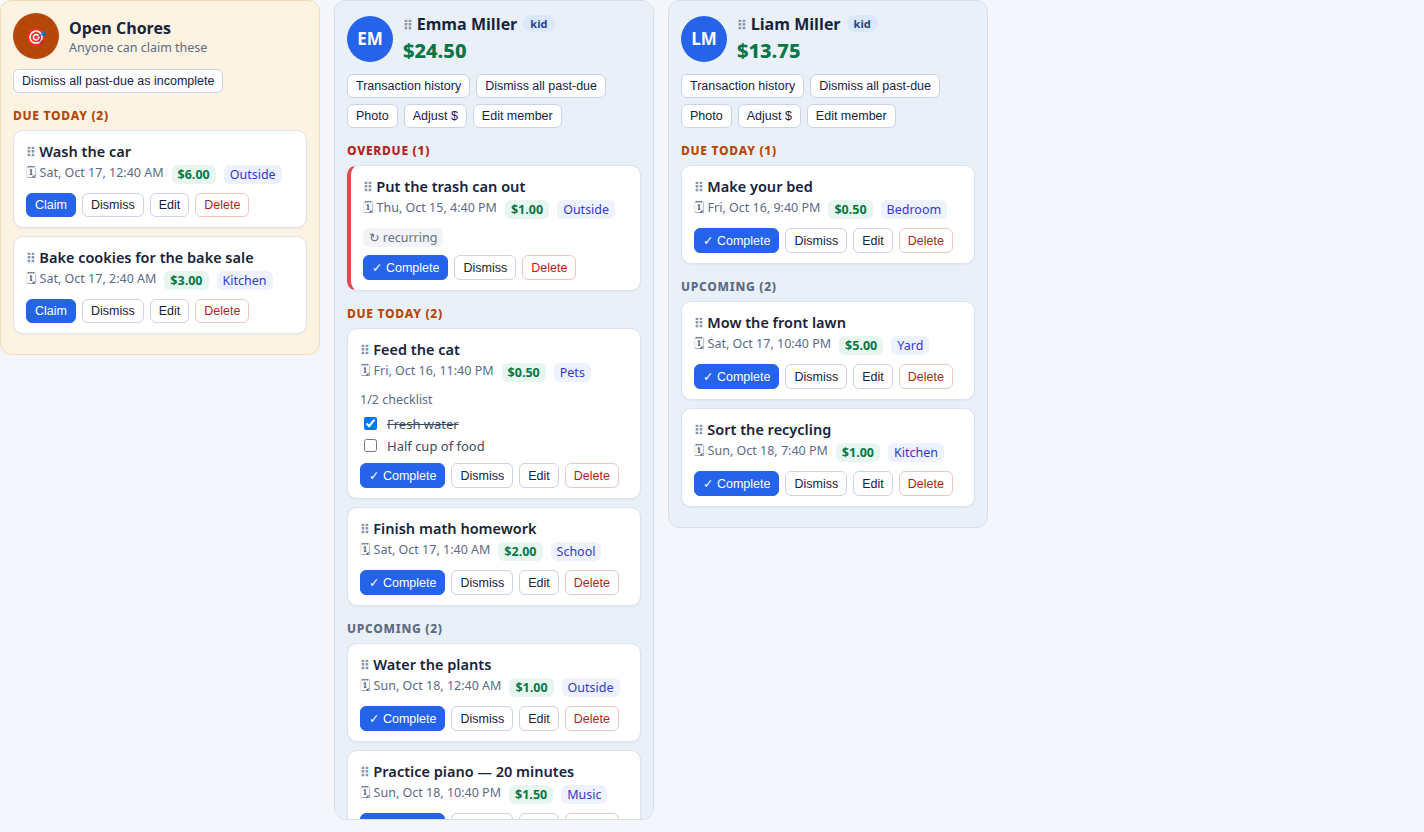
Each column is headed by the person’s photo and their current spendable balance - everyone can see where they stand at a glance.
Overdue · Due Today · Upcoming
Cards group themselves automatically. Upcoming shows the next 10 days only, so the board stays a near-term view; far-future tasks still exist, still remind, and roll in as they approach.
Open Chores pool
Unassigned jobs anyone can claim - the claimer earns the pay. The family chooses whether the pool sits left, right, or hidden.
Drag to reorder
Adults can drag lists into a new order, and hide a member’s list without deleting their account, balance, or history.
Clean-slate button
Per list, adults can dismiss all past-due tasks as incomplete in one click - a fresh start after a busy week.
Tasks and chores
Rich task cards
Title, description, category, checklist, due date and time (family default 8:00 PM), and a dollar amount on every task.
Starter templates
Searchable built-in catalogs of common tasks, recurring chores, and rewards - type to filter, click to prefill. Picking a template never saves anything by itself.
Photo proof
Kids can attach a photo when completing a task - the made bed, the empty sink, the proof is in the picture.
Adults stay in the loop
Every completion and every reward redemption emails all adults in the family automatically.
Money: balances and the ledger
Instant credit
Completing a task credits its amount instantly by default - and recurring tasks pay every single occurrence.
A real ledger
Balances are never edited directly. Task credits, redemptions, and manual adjustments are all written to a ledger, with a full transaction history per person.
Approvals, if you want them
Two family settings let adults approve a kid’s completion before it credits, and a redemption before it charges. Both are off by default.
Rewards
A store you control
Adults create rewards with a cost, a frequency (once, daily, weekly, monthly, or unlimited), and an optional stock limit.
No double-spending
Redeeming deducts the cost and emails the adults. Out-of-stock and already-redeemed rewards can’t be spent twice.
Prices teach proportions
A $1 trash run and a $10 movie night make saving a real decision - kids learn what work is worth by choosing.
Recurring chores and reminders
Daily, weekly, monthly
Trash out every Wednesday at 7:00 AM, a Saturday routine at 10:00 AM - recurring chores regenerate and pay on schedule.
Reminder emails
Multiple reminders per task, in minutes, hours, or days before the due time. A family default (24 hours before) applies unless a task overrides it.
Roles and family accounts
Adults are admins
Everyone logs in with their own account. Adults manage members, tasks, rewards, and settings; kids claim, complete, and redeem - management screens are adult-only.
Multi-tenant by design
Any family can create its own account, completely separate from every other family. Your board is yours alone.
Kiosk mode
A wall board with a PIN
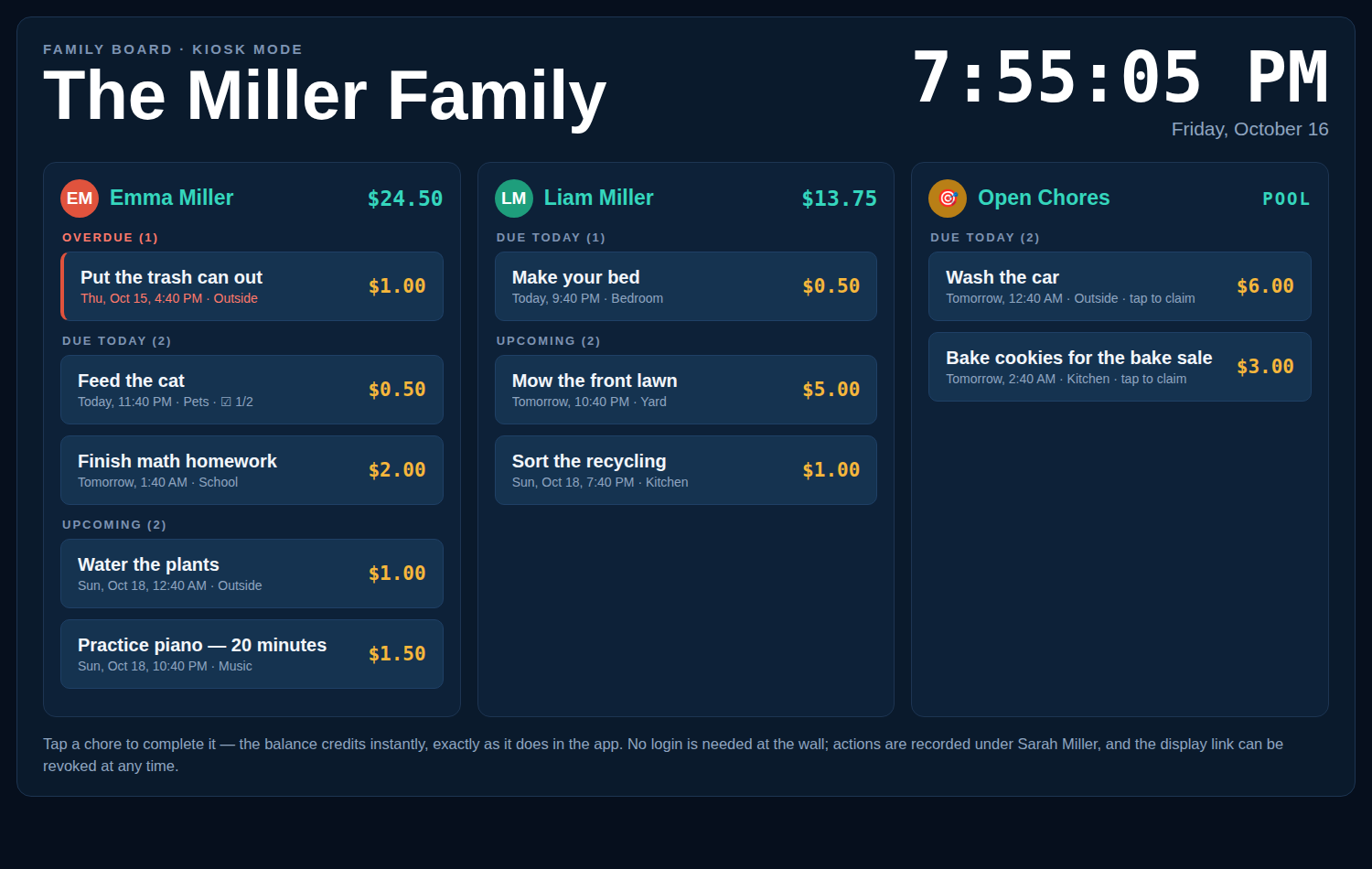
Create a display link for a wall tablet: a dark, fullscreen touch board showing only the lists you choose, with a live clock and tap-to-complete rows. An optional 4-digit PIN guards the board, actions are recorded under the link’s creator, there’s no management surface, and links can be revoked at any time. Read more on the kiosk mode page.
AI assistants, REST API, and MCP
Your assistant can run the list
The full surface - tasks, recurring chores, claims, rewards, balances, history, adjustments - is exposed through a REST API and an MCP server. Adults create revocable API keys in settings; one key works for both. Ask your AI to “add a $2 Saturday trash chore for Aaryan” or “what’s Rohan’s balance?” Setup guides are on the AI & API page.
Comparing Chore-List with the alternatives
Skylight Calendar alternative
The wall board without the $319.99 screen or the $79/yr subscription.
OurHome alternative
OurHome is discontinued - rebuild its points-and-rewards chores in dollars.
Cozi alternative
Keep the calendar, add chores that pay.
FamilyWall alternative
The chore-focused option next to the all-in-one organiser.
A chore app that pays
Real dollar balances without a debit card or bank account.
Greenlight alternative
Chores and allowance without the debit card or the monthly fee.
BusyKid alternative
Instant pay instead of an approved payday - no prepaid card.
Sweepy alternative
By person, not by room - with free household sharing.
Tody alternative
Chores assigned to people with pay, not rooms tracked by dirtiness.
Cleaning apps for families
The Sweepy & Tody guide: track who did the work, not just the dirt.
The AI chore app
Let an AI assistant run the list over API and MCP.
The board, on the kitchen wall
Open a display link on any tablet or TV browser and the board becomes a wall display: live clock, tap-to-complete rows, an optional PIN - and none of the management controls.
Try it with your family
Free while in beta. Your own private board, set up in about a minute.