
Family Command Center: Build One Tonight From a Tablet You Own
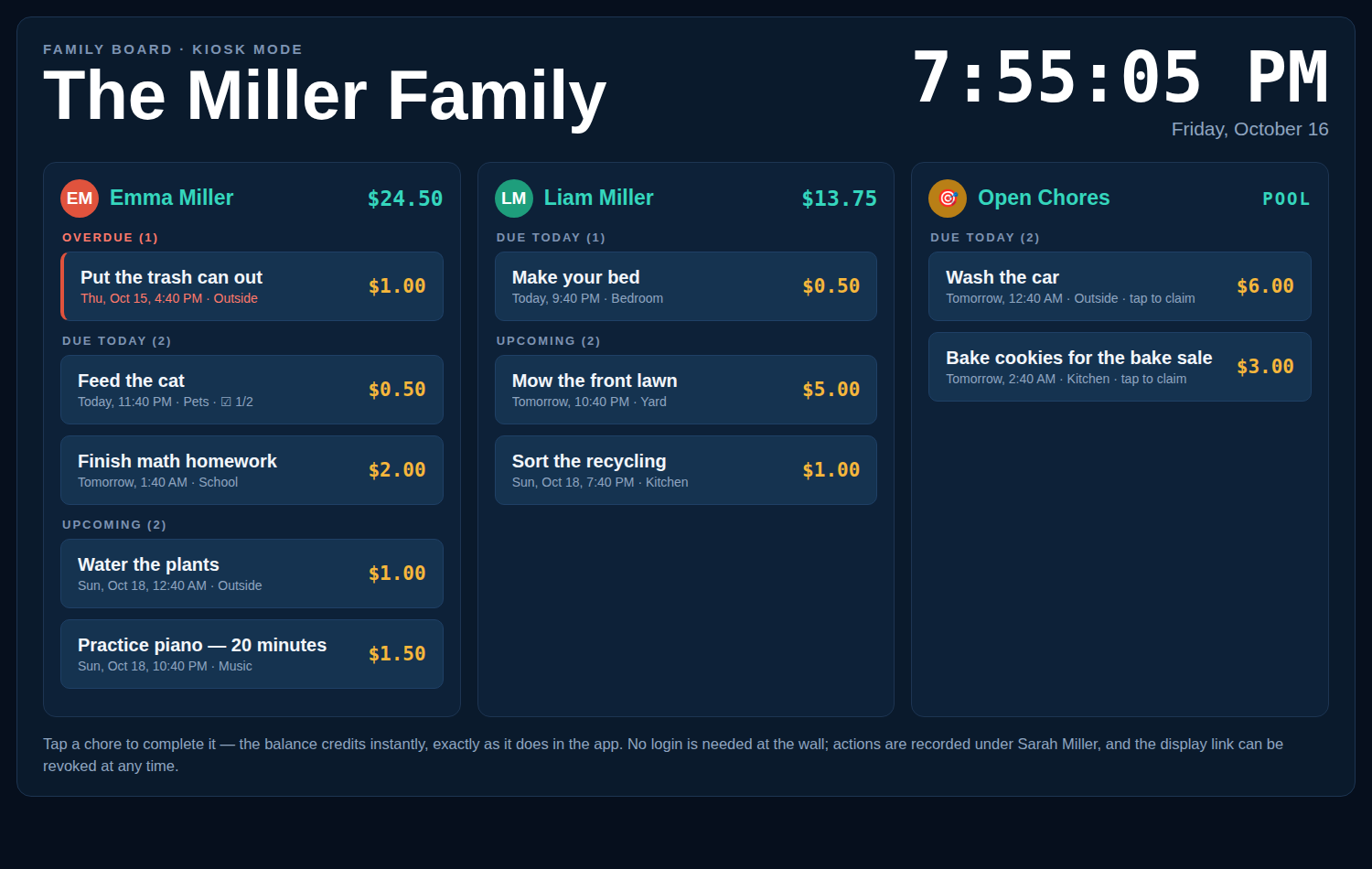
A family command center is a central household display - one screen where everyone can see what’s on, who’s doing what, and what’s next. With Chore-List kiosk mode, the tablet in your drawer becomes one tonight: a fullscreen chore board with a live clock, every kid’s list and balance, readable across the kitchen - for $0.
What belongs on a digital family command center?
- Today’s work, at a glance: chores grouped into Overdue, Due Today, and Upcoming - no digging through an app.
- Everyone’s status: one column per person with their photo and current balance.
- A live clock big enough to read from the stove - tapping it refreshes the board on demand; it also refreshes itself every five minutes.
- Zero friction: no logins at the wall. Kids tap a chore done; parents manage from their phones.
Set it up in three steps
- Pick a screen. An old iPad, a Fire tablet, a spare Android tablet, or even a TV with a browser. If it opens a web page, it works.
- Create a display link. In Chore-List, an adult creates a revocable display link and picks which lists it shows.
- Open the link and mount the tablet. Fullscreen board, live clock, big touch targets. Keep it plugged in, set the screen to stay awake, and you’re done.
Safe by design
A command center sits in a shared space, so the display link is deliberately limited: it shows only the board lists you chose. There are no settings, no balance editing, and no management controls on that screen, and everything completed at the kiosk is recorded under the adult who created the link. Lost the tablet or want it back? Revoke the link and that screen is out - instantly.
How is this different from a Skylight or Hearth display?
Those are dedicated calendar displays - $319.99 for a 15″ Skylight plus $79/year for its Plus features - built around schedules and photos. A Chore-List command center is built around chores and earnings, runs on hardware you already own, and costs nothing. Families whose hub is mainly a calendar should compare honestly on the Skylight Calendar alternative page; families whose hub is “who does what, and what have they earned” are home here.
Frequently asked questions
How much does it cost to set up a family command center?
$0, plus a device you already own. Chore-List is free while in beta, kiosk mode included, and the display is any browser - the common setup is a retired tablet that was already in a drawer.
Can I show the same board in two places?
Yes - create a display link per screen (kitchen, hallway, a grandparent’s house). Each link is independent and revocable, and all of them show the same family’s board.
Will the screen stay current on its own?
Yes. The kiosk refreshes every five minutes automatically, and tapping the clock forces an immediate reload, so a chore added from a parent’s phone shows up on the wall without anyone babysitting it.
Can kids change settings or balances from the wall?
No. The kiosk can complete and claim chores - that’s all. Balances, rewards, members, and settings live behind adult logins in the app.
What screen size works best?
Anything from a 8″ tablet up works; 10″ or larger is the kitchen sweet spot for reading across the room. On a TV, the board simply scales up.
All the kiosk details live on the kiosk mode page.
Your command center is already in a drawer.
Dig out the tablet, open the link, done.
Last updated October 15, 2026.