
Chore List for Kids With ADHD: Visual, Visible, Instantly Rewarding
Parents of kids with ADHD tend to land on the same chore system: the list lives in one fixed, visible place; only a few tasks show at a time; big jobs are broken into steps; and finishing pays off immediately, not at the end of the week. Chore-List is built exactly that way - here is how to set it up.
The five rules that make it work
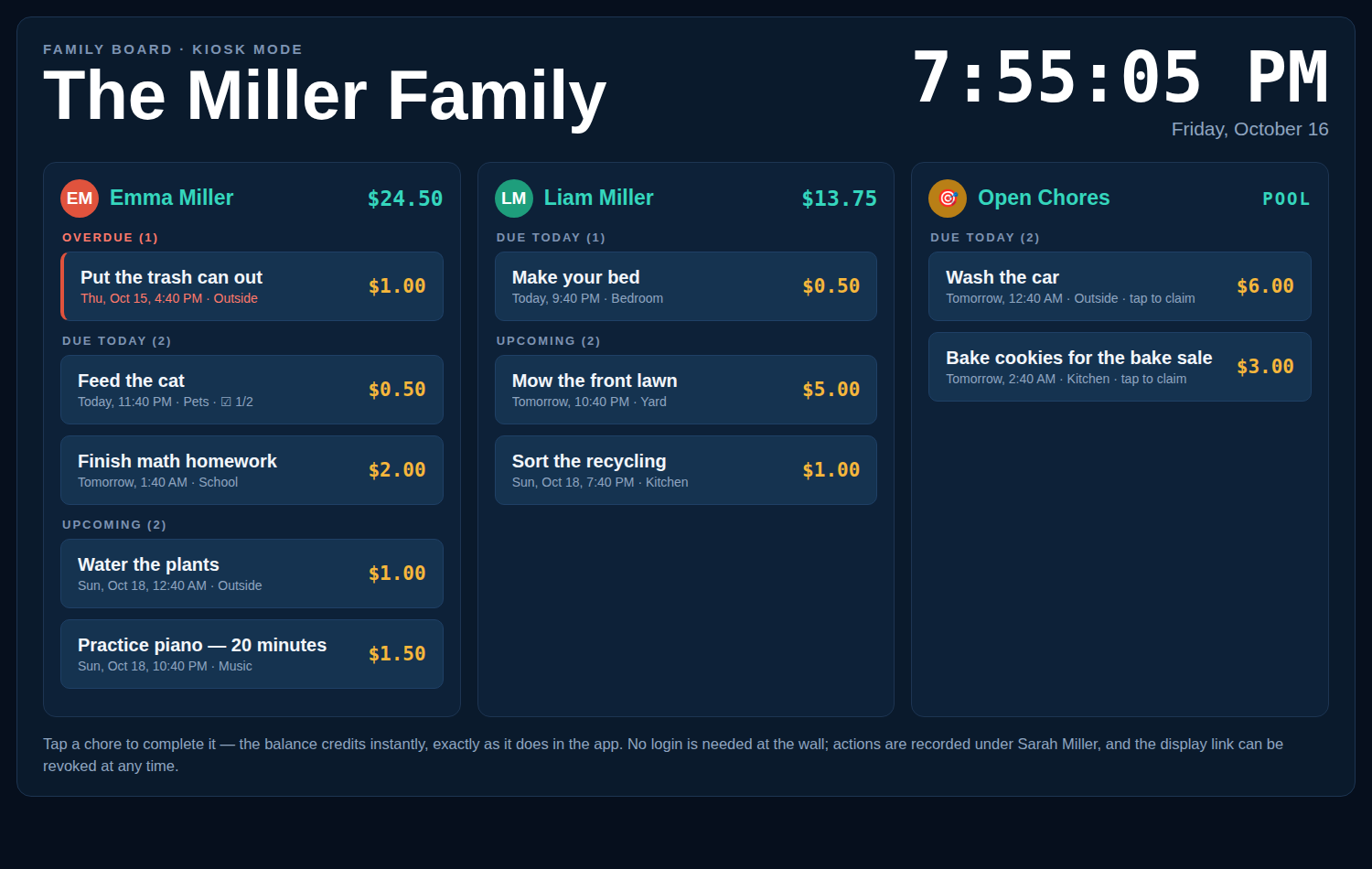
- The list lives where the kid lives. A paper chart migrates to a drawer; an app hides behind a phone unlock. A kitchen tablet in kiosk mode shows the same board, in the same place, all day - checking it becomes walking past it.
- Few tasks, clearly grouped. The board shows only Overdue, Due Today, and the next 10 days - never a month of obligations at once. One list per person means your child sees only their column, headed by their photo.
- Break big chores into checklists. “Clean your room” is five invisible tasks wearing a trench coat. A checklist - bed, floor, desk, laundry out, trash out - turns it into five small wins, each tickable.
- Reward instantly, not eventually. A allowance on Friday is too far away to motivate on Tuesday. Completing a chore credits the balance the second it’s tapped done, and rewards in the store are priced in the same dollars - the cause and effect are one tap apart.
- Let the system remind. Email reminders at offsets you set mean the prompt comes from the board, not from a parent’s rising voice - reminders stop being conflict.
A starter setup
| Piece | Setting | Why |
|---|---|---|
| Daily chores | 2-3 max, recurring | Short list, finished most days - momentum over ambition |
| Due times | Tied to existing anchors (after breakfast, before dinner) | Time-blindness is easier with anchors than clock times |
| Prices | Small, immediate ($0.25-$2) | Fast feedback loops beat large distant payouts |
| Proof | Photo on completion | “Done” gets verified without an inspection tour |
| Extras | Open Chores pool | High-energy days get a productive outlet that pays |
What parents tell us breaks (and the board’s answer)
- “He forgot” - every day. The board doesn’t rely on memory: it’s visible in the kitchen, grouped by what’s due today, and it emails reminders.
- The chart worked for a week, then faded. Novelty fades; balances don’t. The running total and the rewards store keep a reason to check in after week one.
- Arguments about whether it was done. Photo proof and a completion timestamp end the debate without a referee.
- One system per kid. Siblings share the board but keep separate lists and balances - no comparisons, no shared fate.
Frequently asked questions
Is this medical advice?
No - this page is about organizing chores, based on the setup patterns parents of kids with ADHD commonly use: visual lists, small steps, immediate rewards. For anything clinical, talk to your child’s clinician.
How many chores should I start with?
Two daily chores, done reliably, beat six done in a panic. Add one at a time as the routine holds; the board makes adding a recurring chore a ten-second job.
Does my child need their own device?
No - the kiosk board on a shared kitchen tablet is the setup most families use. Kids tap their own list; no logins to swap at the wall.
Can rewards be things other than money?
Yes - the balance is in dollars, but rewards are anything you price into the store: screen time, choosing dinner, a later weekend bedtime, or cashing out for real.
Is Chore-List free?
Yes - free for families while in beta, including checklists, recurring chores, reminders, rewards, and the kiosk display.
For the full age-by-age list, see the kids chore list; for reusable patterns, the chore list templates.
A list they can see, that pays the second it’s done.
Set up your family’s board in about a minute - free.
Last updated October 17, 2026.